NuMicro ICP Programmer Nu-Link Nu Link Nuvoton Emulator M0/M4 Series Chips (DB0138) Products
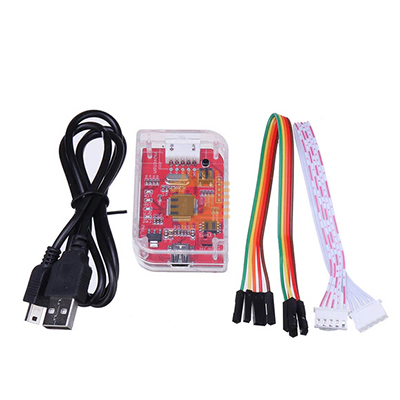

| Name | NuMicro ICP Programmer Nu-Link Nu Link Nuvoton Emulator M0/M4 Series Chips |
| Code | DB0138 |
| Price | Rs.3,850.00 |
| In Stock | Yes |
| Package | MODULE |
Product Details
The NuMicro ICP Programmer Nu-Link is a high-performance In-Circuit Programmer and Debugger (ICP/ICD) designed for Nuvoton NuMicro microcontrollers, including Arm® Cortex®-M0 and Cortex-M4 series devices. Officially supported by Nuvoton, this tool provides seamless programming and real-time debugging via popular IDEs, making it ideal for development, testing, and production programming.
Key Features:
- Nu-Link Programmer & Debugger: Combines programming and on-chip debugging in one unit
- Supports M0/M4 Series: Fully compatible with Nuvoton NuMicro Cortex-M0 and M4 microcontrollers
- In-Circuit Programming (ICP): Flash and configure devices without removing them from the board
- Real-Time Debugging: Step through code, watch variables, and set breakpoints
- Integrated USB Interface: Connects directly to a PC via USB for power and data
- IDE Support: Works with Nuvoton’s official IDE and tools (NuWriter, NuLink utilities, Keil µVision, etc.)
Specifications:
- Model: Nu-Link (ICP Programmer / Emulator)
- Supported MCU Families:
- NuMicro M0 Series
- NuMicro M4 Series
- Interface: USB for host connection; SWD/SWV or debug connector to target MCU
- Programming Mode: In-Circuit Programming (ICP) / In-Circuit Debugging (ICD)
- Power: Bus-powered via USB or optional target power sensing
- Compatible Software: Nuvoton IDE/Tools, Keil µVision, IAR Embedded Workbench (depending on setup)
- Operating Systems: Windows (standard support; check specific toolchain requirements)
Applications:
- Firmware development and testing for Nuvoton microcontrollers
- In-Circuit Programming of production boards
- Debugging embedded applications on M0/M4 MCUs
- Educational and professional development environments
- Rapid prototyping and embedded system development
Features:
- In-Circuit programming target chip
- Online/offline programming mode
- Backup flash data of target chip (If the target chip is not flash protected)
- Backup offline flash data of Nu-Link dongle (if offline data has been unprotected)
- Write software serials number (SN) to target chip
- Limit the maximum programming count
- Data encryption for online/offline programming
- Batch mode for online/offline programming
Preparing for ICP Programming Tool
System Requirements
The hardware and software requirements for installing the ICP Programming Tool system are as follows:
- PC/AT compatible machine with Pentium or higher CPU
- XVGA(1024*768) color monitor
- At least 512M RAM for best performance
- At least 20M free disk space
- Windows 2000/XP/Vista/7
Hardware Installation
- Step 1: Plug USB cable into the USB port of the ICP Programming Tool board.
- Step 2: Connect the ICP Programming Tool board with ICE interface of DEV board.
Software Installation
- Please run the installer package to install the software
Software
This chapter describes operation modes of the ICP Programming Tool and Nu-Link dongle.
ICP Programming Tool Modes
- The ICP tool supports “online” and “offline” programming mode.
Online Programming Mode
- If the “Offline programming mode” option in Figure 4-14 is unchecked, ICP
- Programming Tool will program in online programming mode.
- Click the “Start” button to start to program target device immediately.
- The target device must be connected to Nu-Link.
Offline Programming Mode
- If the “Offline programming mode” option is checked, the ICP
- Programming Tool will program in offline programming mode.
- Click the “Start” button to save the file data into Nu-Link at first, no matter a target device is connected to Nu-Link or not.
Sharing is caring, show love and share the product with your friends.
Featured


Add to Cart


Add to Cart
Other Products
Add to Cart
Add to Cart