3D Printer Nozzle MK-ST 0.4mm/1.75mm Brass Creality (MT0481) Products
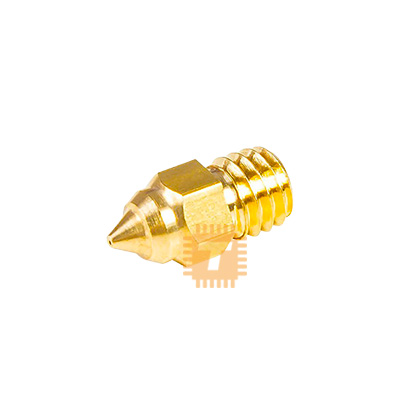
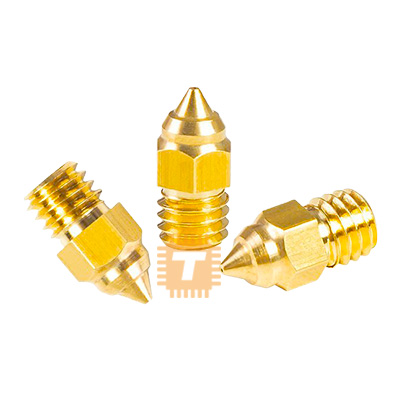
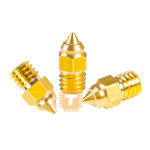
| Name | 3D Printer Nozzle MK-ST 0.4mm/1.75mm Brass Creality |
| Code | MT0481 |
| Price | Rs.170.00 |
| In Stock | Yes |
| Package | CNC |
Product Details
The Creality MK-ST Brass Nozzle (0.4mm) is a standard replacement extrusion nozzle engineered for MK8-style hotends across Creality's FDM 3D printer lineups. Manufactured from high-thermal-conductivity brass with a precision-machined internal bore, this nozzle delivers smooth filament flow, uniform melting, and consistent layer extrusion for standard 1.75mm filaments.
Specification
- Manufacturer: Creality 3D
- Nozzle Type / Standard: MK-ST (Standard MK8 Profile)
- Orifice Output Diameter: 0.4mm
- Input Filament Diameter: 1.75mm
- Material Composition: International Standard High-Purity Brass (H59 / H62)
- Thermal Conductivity: Approx. 105 W/(mK)
- Maximum Printing Temperature: Up to 260°C - 300°C
- Screw Thread Standard: Metric M6 (M6 x 0.75mm / M6 x 1.0mm standard MK8 pitch)
- Total Length / Hex Width: 13mm overall length / 6mm hex flat diameter
- Inner Wall Roughness: Ra less than 0.4 µm (Smooth internal mirror-bore finish)
- Printer Compatibility: Fits standard MK8 hotends including Ender-3, Ender-3 Pro, Ender-3 V2, Ender-3 Max, Ender-5 / Pro / Plus, CR-10, CR-10S, CR-20, and other MK8-threaded extruder blocks.
Features
- High Thermal Conductivity Brass: Brass heats up rapidly and distributes thermal energy evenly throughout the nozzle core, ensuring consistent melting rates for clean layer bonding and minimal stringing.
- Precision CNC Chamfer and Mirror Bore: Machined with a polished internal cavity (Ra less than 0.4 µm) and a smooth entry chamfer that reduces internal friction, preventing filament snagging and minimizing micro-clogs.
- Standard 0.4mm Balance: The 0.4mm orifice provides the ideal balance between fine surface detail (layer heights from 0.12mm to 0.28mm) and reasonable print speeds for everyday prototyping.
- Flat Sealing Face: The flat rear mating face forms a tight mechanical seal against the internal PTFE tube or heatbreak throat when hot-tightened, preventing molten filament from leaking over the heater block.
Common Applications
- General 3D Printing and Rapid Prototyping: Everyday printing of mechanical parts, enclosures, functional brackets, and cosmetic models using standard filaments like PLA and PETG.
- High-Detail Model Making: Printing miniatures, decorative items, and architectural models requiring fine layer lines and precise extrusion control.
- Regular Maintenance and Nozzle Replacement: Swapping out worn, scratched, or clogged factory nozzles to restore original extrusion precision and prevent print defects.
Professional Installation and Maintenance Tips
- Always Hot-Tighten the Nozzle: Never fully tighten a new nozzle while the heater block is cold. Thread the nozzle in finger-tight until seated, heat the hotend to 250°C, hold the heater block firmly with an adjustable wrench or pliers to avoid twisting the throat tube, and tighten with a 6mm socket wrench to roughly 1.5 to 2.0 Nm of torque. This prevents molten filament from leaking through the upper threads during printing.
- Ensure a Tight PTFE Tube Fit (For Bowden Hotends): On standard MK8 hotends, ensure the PTFE Bowden tube is cut perfectly square at 90 degrees and pressed all the way down against the top of the nozzle before locking the pneumatic coupler. Any gap between the tube and nozzle creates a pocket where molten plastic accumulates and causes severe clogs.
- Avoid Abrasive Filaments on Brass: Filaments containing abrasive additives (carbon fiber, glass fiber, wood, metal powder, or glow-in-the-dark phosphors) act like sandpaper on soft brass, rapidly wearing a 0.4mm hole out to 0.6mm or larger in just a few hundred grams of printing. Use hardened steel or bi-metal nozzles for abrasive materials.
- Re-Check Z-Offset After Replacement: Manufacturing tolerances between nozzles can vary by fractions of a millimeter. After installing a new nozzle, always re-level your build plate and calibrate the Z-offset to avoid dragging the nozzle across your print surface.
Sharing is caring, show love and share the product with your friends.
Featured


Add to Cart


Add to Cart
Other Products
Add to Cart
Add to Cart