Creality SparkX i7 3D Printer (MT0521) Products
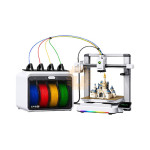
| Name | Creality SparkX i7 3D Printer |
| Code | MT0521 |
| Price | Rs.1,35,000.00 |
| In Stock | Yes |
| Package | CNC |
Product Details
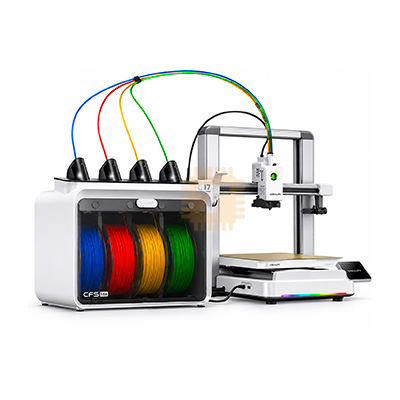
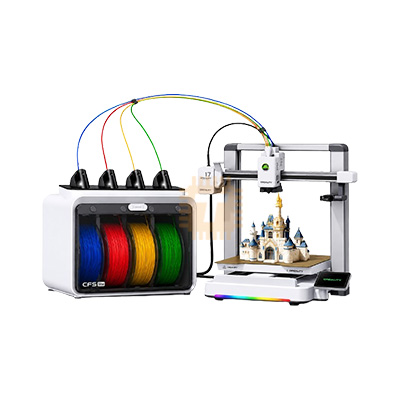
The Creality SparkX i7 is a modern, high-speed desktop FDM 3D printer engineered to balance performance with beginner-friendly accessibility. Built on a bed-slinger Cartesian motion system, it combines rapid motion capabilities (up to 500 mm/s) with extensive automation, eliminating traditional manual setup barriers. The printer features full pre-print auto-calibration, a tool-free quick-swap hotend, integrated AI camera monitoring, and native support for Creality’s CFS multi-color filament systems (such as the CFS Lite and CFS Nano) to enable multi-material 3D printing with reduced filament waste.
Specifications
- Print Technology: Fused Filament Fabrication (FFF / FDM)
- Build Volume: 260 × 260 × 255 mm
- Motion Architecture: Cartesian (Bed-Slinger) with X-axis linear rail and dual Z-axis lead screws
- Maximum Print Speed: Up to 500 mm/s
- Maximum Acceleration: Up to 10,000 mm/s²
- Extruder Type: Direct-drive extruder
- Max Hotend Temperature: Up to 300 °C (Integrated nozzle & heatbreak design)
- Max Heated Bed Temperature: Up to 100 °C
- Build Plate: Dual-sided textured PEI flexible spring steel sheet
- Multi-Color Compatibility: Creality CFS Lite (4-slot enclosed with desiccant/RFID), CFS Nano, or CFS Mini
- Firmware: Klipper-based system
- User Interface: 2.85-inch color touchscreen
- Camera / Monitoring: Built-in AI camera
- Connectivity: Wi-Fi, USB drive
- Supported Filaments: PLA, PLA-Silk, PETG, TPU (Shore 64D or harder), PLA-CF (ABS/ASA with enclosure)
- Dimensions & Weight: 470 × 423 × 456 mm; ~9.12 kg
Features
- Full Hands-Off Auto-Calibration: Features automated pre-print preparation, including automatic bed leveling, active Z-offset calibration, vibration compensation (input shaping), and nozzle auto-wiping without manual screw or knob adjustment.
- Smart AI Camera Detection: Built-in camera monitors builds in real time to catch common printing failures—such as spaghetti, air printing, filament runout/tangles, and displaced build plates—and sends instant alerts to save filament.
- Multi-Color Printing with Reduced Purge: Works seamlessly with Creality’s CFS units to print up to four colors per job, utilizing optimized purge routines engineered to reduce transition waste by up to 50% compared to conventional multi-color setups.
- Tool-Less Quick-Swap Hotend: Employs a quick-release latch system that allows users to swap hotends or clear filament jams in seconds without screwdrivers or specialized tools.
- CubeMe 2D-to-3D AI Generation: Integrated software feature allows users to convert 2D photos and portraits directly into print-ready 3D models without requiring CAD experience.
- Quiet Night Mode & Programmable RGB: Features a programmable front RGB light bar that displays real-time printing states, alongside a dedicated "Night Mode" that turns off lighting and keeps operating noise near ~45 dB for undisturbed overnight printing.
Common Applications
- Multi-Color Decor & Toys: Multi-colored figurines, desktop models, tabletop gaming miniatures, signs, and decorative items printed without post-print painting.
- Everyday Household Utility: Brackets, organizers, hooks, cable management components, and replacement mechanical parts around the home or workshop.
- Rapid Prototyping: Fit tests, proof-of-concept modeling, and electronic enclosures for makers, hobbyists, and product designers.
- Personalized Gifts: Custom lithophanes, photo-to-3D portrait models (via CubeMe), keychains, and custom branding items.
- Flexible Parts: Dampers, phone cases, and soft seals utilizing semi-flexible filaments like TPU (64D+).
Usage Tips
- Plan Workbench Depth: As a bed-slinger machine, the bed travels forward and backward during operation. Allow at least 740–750 mm of depth clearance on your table to ensure the bed and cabling do not collide with walls.
- Maintain PEI Bed Adhesion: Keep the textured PEI sheet clean by washing it periodically with warm water and basic dish soap to remove finger oils. Between prints, wipe it down with >90% isopropyl alcohol (IPA).
- Calibrate Flush Volumes for Multi-Color: When using the CFS system, fine-tune your slicer's flushing/purge volumes—especially when transitioning from dark pigments (like black) to lighter ones (like white)—to avoid bleeding while keeping purge waste minimal.
- Dry Your Filament: High-speed printing and multi-material retracting cycles amplify stringing and oozing if the filament has absorbed ambient moisture. Always dry PETG, TPU, and CF composites before starting long prints.
- Prioritize Detail over Max Speed: While capable of 500 mm/s, lower the outer wall and top surface speeds (150–250 mm/s) on detailed display pieces or miniatures for optimal surface smoothness and finish
Sharing is caring, show love and share the product with your friends.
Featured

Add to Cart


Add to Cart

Add to Cart
Other Products
Add to Cart
Add to Cart
Add to Cart