
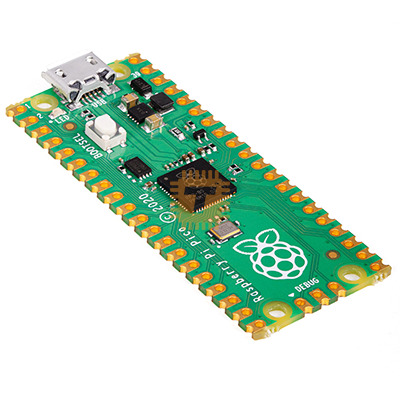
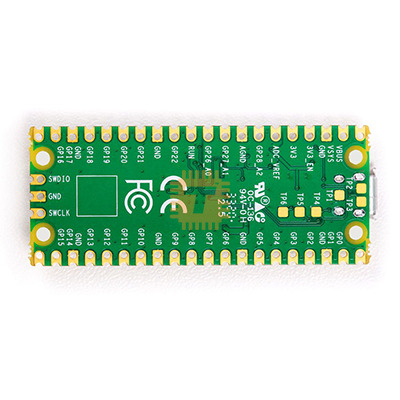
Raspberry Pi Pico RP2040 Microcontroller Board Original UK (DB0103) Products
| Name | Raspberry Pi Pico RP2040 Microcontroller Board Original UK |
| Code | DB0103 |
| Price | Rs.2,600.00 |
| In Stock | Yes |
| Package | MODULE |
Product Details
Features:
- RP2040 microcontroller chip designed by Raspberry Pi in the United Kingdom
- Dual-core ARM Cortex M0+ processor, with a flexible clock running up to 133 MHz
- 264 kB SRAM, and 2 MB on-board Flash memory
- Castellated module allows soldering directly to carrier boards
- USB 1.1 host and device support
- Energy-efficient sleep and dormant modes
- Drag and drop programming using mass storage via USB
- 26 multifunction GPIO pins
- 2× SPI, 2× I²C, 2× UART, 3× 12-bit ADC, 16× controllable PWM channels
- On-chip accurate clock and timer
- Temperature sensor
- On-chip accelerated floating point libraries
- 8× programmable IO (PIO) state machines for custom peripherals
Drag and drop MicroPython:
You can program your Pico by connecting it to a computer via USB, then dragging and dropping a file onto it, so we’ve put together a downloadable UF2 file to let you install MicroPython more easily.
- Download the MicroPython UF2 file by clicking the button below.
- Push and hold the BOOTSEL button and plug your Pico into the USB port of your Raspberry Pi or other computer.
- Release the BOOTSEL button after your Pico is connected to your computer.
- It will mount as a Mass Storage Device called RPI-RP2.
- Drag and drop the MicroPython UF2 file onto the RPI-RP2 volume.
- Your Pico will reboot. You are now running MicroPython.
- You can access the REPL and MicroPython via USB Serial.
Sharing is caring, show love and share the product with your friends.
Featured

Add to Cart

Add to Cart

Add to Cart

Other Products

Add to Cart

Add to Cart
Add to Cart
