REX-C700 Dual Digital RKC display PID temperature controller REX-C700FK07 (MD0704) Products
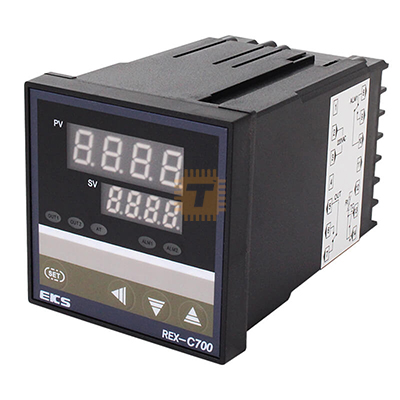
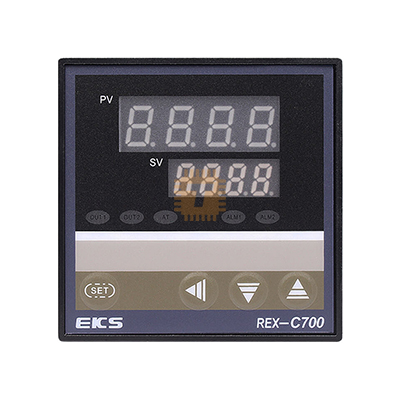
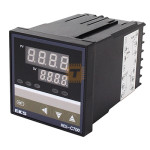
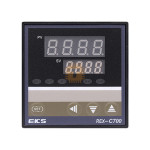
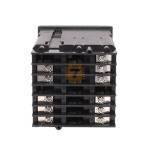
| Name | REX-C700 Dual Digital RKC display PID temperature controller REX-C700FK07 |
| Code | MD0704 |
| Price | Rs.4,250.00 |
| In Stock | Yes |
| Package | MODULE |
Product Details
The REX-C700 Dual Digital PID Temperature Controller (R KC series) is an advanced and versatile instrument designed for precise temperature measurement and control in industrial, laboratory, and process applications. With dual digital displays, PID control algorithm, and robust input/output options, the REX-C700 delivers accurate, stable temperature regulation for heating and cooling systems, ovens, furnaces, incubators, and more.
This controller combines user-friendly operation with flexible functionality, allowing both novice users and experienced technicians to implement reliable temperature control solutions.
Key Features
- Dual Digital Display: Simultaneous display of measured temperature and setpoint for clear real-time monitoring
- PID Control Algorithm: Advanced PID control with auto-tuning improves stability and response
- Heating/Cooling Output: Supports both heating and cooling modes (independent or combined outputs)
- Multiple Control Modes: ON/OFF, PID, and auto-tuning functionality for flexible control strategies
- Universal Sensor Input Support: Compatible with thermocouples (such as K, J, T, E), RTDs (Pt100), and other sensors
- Alarm Functions: Configurable high/low alarm limits for process safety and automated response
- Relay and SSR Outputs: Options for mechanical relay or solid-state relay (SSR) control based on application needs
- Front-Panel Settings: Easy access to setpoints, control parameters, and configuration via intuitive buttons
- Compact DIN Panel Mount Design: Standard size for panel installation in control cabinets and automation racks
- High Accuracy & Stability: Ensures precise temperature control with minimal fluctuation
- Event Logging & Protection: Over-temperature protection and event indicators improve process safety
Specifications
- Model: REX-C700FK07 (PID temperature controller)
- Controller Type: Digital PID Temperature Controller
- Display: Dual digital LED/LCD (setpoint & measured value)
- Input Types Supported: Thermocouples (K, J, T, E, etc.), RTDs (Pt100)
- Control Output:
- Relay outputs or SSR drive (depends on specific variant)
- Heating and cooling control channels (dual outputs)
- Control Modes: PID, ON/OFF, manual, auto-tuning
- Alarm Outputs: Configurable high/low alarms with independent outputs
- Power Supply: Typically 85–265VAC (model dependent)
- Mounting: Standard 72×72 mm or DIN panel cut-out
- Control Accuracy: High resolution with minimal drift
- Operating Temperature: Standard industrial range
How to Use – Step-by-Step Guide
Step 1: Mount the Controller
- Cut the panel according to the controller’s DIN size.
- Insert the REX-C700 into the panel cut-out.
- Secure it using the supplied mounting clips.
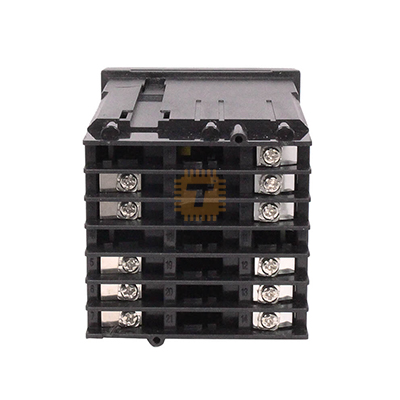
Step 2: Wiring Connections
- Power Supply:
Connect AC power (85–265VAC) to the power terminals. - Temperature Sensor:
Connect the thermocouple or PT100 sensor to the input terminals (ensure correct polarity for thermocouples). - Control Output:
- Connect the relay or SSR output to your heater or cooling device.
- Use an SSR for high-power or frequent switching applications.
- Alarm Output (Optional):
Wire alarm terminals to buzzers, indicators, or safety relays if required.
Step 3: Power On
- Turn on the power supply.
- The display will show the current measured temperature (PV).
- The set temperature (SV) will appear on the secondary display.
Step 4: Set the Target Temperature
- Press the SET button.
- Use the ▲ / ▼ buttons to adjust the desired temperature.
- Press SET again to save the value.
Step 5: Select Control Mode
- Enter the parameter menu by holding the SET key.
- Choose:
- PID Mode for precise and stable control
- ON/OFF Mode for simple applications
- Confirm the selection and exit the menu.
Step 6: Run Auto-Tuning (Recommended)
- Enable Auto-Tune (AT) in the settings.
- The controller will automatically calculate optimal PID values.
- Auto-tuning completes after several heating cycles.
- Once finished, the system maintains temperature with minimal fluctuation.
Step 7: Set Alarm Limits (Optional)
- Access the alarm parameter menu.
- Set high and low temperature limits.
- These alarms activate outputs if temperature exceeds safe limits.
Step 8: Normal Operation
- The controller continuously compares actual temperature (PV) with set value (SV).
- It automatically adjusts output power to maintain the target temperature.
- Alarms activate if abnormal conditions occur.
Typical Applications
- Industrial ovens and furnaces
- Plastic extrusion and molding machines
- Food processing and baking equipment
- Laboratory incubators and heaters
- HVAC temperature control panels
- Brewing and fermentation systems
Sharing is caring, show love and share the product with your friends.
Featured


Add to Cart

Add to Cart

Other Products
Add to Cart


Add to Cart