
STM32F103CBT6 Development Board with SIM800C GSM Module and Relay (MD0590) Products
We are sorry but the product is out of stock, please check back after few days.
| Name | STM32F103CBT6 Development Board with SIM800C GSM Module and Relay |
| Code | MD0590 |
| Price | Rs.6,160.00 |
| In Stock | No |
| Package | MODULE |
Product Details
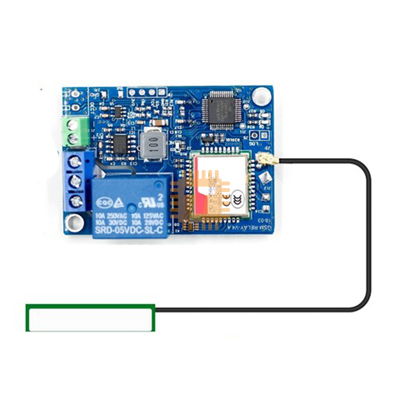
This is an integrated, powerful development board that combines the high-performance ARM Cortex-M3 microcontroller (STM32F103CBT6) with a versatile SIM800C GSM/GPRS module and an onboard relay. This combination makes the board an ideal, compact solution for complex Industrial IoT (IIoT), remote control, data logging, and GSM-based automation projects. The microcontroller handles complex logic while the SIM800C provides reliable cellular connectivity.
Specifications
- Microcontroller: STM32F103CBT6
- Core: ARM 32-bit Cortex™-M3 CPU
- Clock Speed: Up to 72 MHz
- Memory: 128 Kbytes Flash, 20 Kbytes SRAM
- GSM/GPRS Module: SIMCOM SIM800C
- Network: Quad-band 850/900/1800/1900MHz
- Features: Supports SMS, GPRS data, and phone calls
- Antenna: Onboard SMA or IPEX antenna connector
- Onboard Relay: 1 Channel (Typically 5V coil)
- Load Capacity: Capable of switching AC or DC loads (check specific relay model for current/voltage limits)
- Power Supply: DC 6-18V input
- Programming/Debugging: SWD interface (for ST-Link), UART for programming via bootloader
- Peripherals:
- Onboard micro SD card slot
- Reset button and user-programmable buttons
- LED indicators for power and SIM800C status
Features
- All-in-One Solution: Integrates MCU, GSM module, and switching capability on a single PCB, reducing complexity and footprint.
- Remote Control: Ideal platform for controlling remote devices and home/industrial automation via SMS or GPRS.
- Data Logging:
- Utilize the STM32's processing power for sensor data acquisition.
- Use the micro SD card slot for local storage.
- Transmit data remotely via the SIM800C.
- High Performance: STM32 Cortex-M3 provides superior performance compared to traditional 8-bit microcontrollers.
- Connectivity: All unused MCU pins are typically broken out for easy expansion and sensor interfacing.
Application
- Farmland irrigation / Greenhouse / Server room / Pet feeding / Oxygen pump / Roller shutter
Operating Instructions
Mode configuration: Format: *code*$00000N $, N=1, 2, 3, 4. If you want to set this controller work at 1 mode, send the SMS: *123456*$000001$. The device will reply, content is: SYS Mode: 1 Set OK!
Commands:
- Relay On command: CMON, after successful setup, the device will reply SMS is: ON Set OK! For example, send the SMS: CMON. Relay status will be saved.
- Relay Off command: CMOF, after successful setup, the device will reply, SMS Content is: OFF Set OK! Send the SMS: CMOF. Relay status will be saved.
- Relay on for only 1-2 second command: CMDD, After successful setup, the device will reply, SMS Content is: Dian Dong Set OK! For example, send the SMS: CMDD. Relay status will not be saved.
- Relay on for 1-99 minute command: CMSEONTIME(2 bit time), after successful setup, the device will reply, SMS Content is: ON Set OK! TIME ** MIN! The timing range is 1-99 minutes. If you want to control Relay On for 1 minute, send the SMS: CMSEONTIME01. Relay status will not be saved.
- System status query instruction: CMCH. For example, sends the SMS: CMCH
- Remote control: You can control your home devices even if you are in the office.
Note:
- 1 2 3 mode is phone mode, you can not use CHCH CMON CMOF command, you need set 4 mode, 4 mode is message mode, send the SMS: *123456*$000004$ to set the board on 4 mode, you can use below command
SMS command instructions:
- Authorized number set: Format:*code*#Authorized number#, after setup successfully, the device will reply. For example, if system code is 123456, and you want to set the authorized number is 0777854444, send: *123456*#+94777854444#. Device will reply: SYS Number: +94777854444 Set OK. You might have to try the number in several combinations such as 0777854444, 777854444, +94777854444, 94777854444, 0094777854444, etc... until it is working.
- Code set: Format:*6 old code**6 new code*. After setup successfully, the device will reply. For example, if system code is 123456, you want to revise the new code is 666666, send the SMS:*123456**666666*.
- Relay on or off command set: Format: *code*@X text of command@. If you want set relay on command, X=N (n); if set off command, X=F (f). The max size of command is 10. For example, if you want to revise relay on command is CHONLED, send the SMS:*123456*@NCHONLED@.
- Mode set: Format: *code*$00000N $, N=1, 2, 3, 4, 5. If you want to set this controller work at 1 mode, send the SMS: *123456*$000001$. The device will reply: SYS Mode: 1 Set OK! The above configuration will be saved in device.
Relay control command:
- Mode 1(Call control): When relay is off, user can hear 3 ring of the bell, and relay will be on; when relay is on, user can hear 2 ring of the bell, and relay will be off; relay state will be saved.
- Mode 2(Call control): When the device receives this call the relay will be in the state of on. When this call is disconnected, the relay will be in the state of off. Relay state will not be saved.
- Mode 3(Call control): When the device receives this call the relay will be on for1-2 second, the state of the relay will not be saved.
- Mode 5(Call control): When the call is connected, press button 1 of mobile phone, relay will be on, and press button 5, the relay will be off.
- Mode 4(SMS control):
- Relay On command: CMON (or you set); Relay Off: CMOF (or you set);
- Relay on for only 1-2 second: CMDD, Relay on for 1-99 minute: CMSEONTIME**(**is 2 bit time); Relay on for 1-99 hour: CMSEONHOUR**(**is 2 bit time); System status query instruction: CMCH.
Default set: Relay on command: CMON; Relay off command: CMOF; System work mode:4; code:123456
Sharing is caring, show love and share the product with your friends.
Featured


Add to Cart

Add to Cart

Other Products


Add to Cart
