2-Way HDMI Splitter 4K UHD with Power Adapter (TA1886) Products
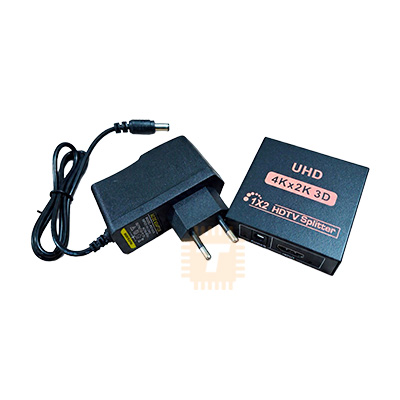
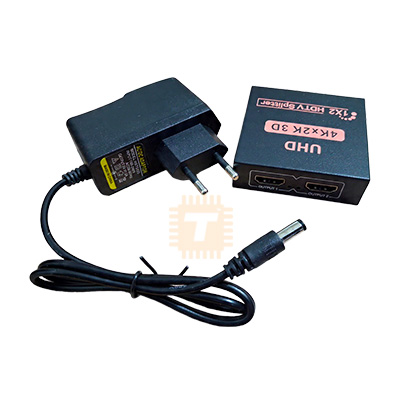
| Name | 2-Way HDMI Splitter 4K UHD with Power Adapter |
| Code | TA1886 |
| Price | Rs.1,300.00 |
| In Stock | Yes |
| Package | CABLE |
Product Details
The 2-Way HDMI Splitter 4K UHD with Power Adapter is an active digital video and multi-channel audio distribution amplifier engineered to duplicate a single Ultra-HD HDMI source simultaneously onto two independent HDMI displays, monitors, projectors, or capture cards without signal degradation or latency. Supporting video resolutions up to 4K × 2K at 30Hz, Full HD 1080p at 120Hz, and deep 3D video formats, it features an integrated signal buffer and equalization amplifier to regenerate digital TMDS signals across long cable runs. Housed in a heavy-duty, heat-dissipating metallic alloy chassis and powered by an external regulated 5V DC power adapter, it guarantees stable, flicker-free audio-visual streaming for home theaters, security monitoring control rooms, digital signage arrays, and retail display demonstrations.
Specifications
- Device Type: 1-Input to 2-Output (1x2) Active HDMI Video Splitter / Distribution Amplifier
- Input Interface: 1 × HDMI Type-A Female (19-Pin Standard Connector)
- Output Interfaces: 2 × HDMI Type-A Female (19-Pin Standard Connectors)
- HDMI Specification Compliance: HDMI 1.4b (Backward compatible with HDMI 1.3, 1.2, and 1.1)
- HDCP Protocol Compliance: HDCP 1.4 (High-bandwidth Digital Content Protection)
- Supported Video Resolutions:
- 4K × 2K (3840 × 2160) at 30 Hz and (4096 × 2160) at 24 Hz
- Full HD 1080p (1920 × 1080) at 50/60/120 Hz
- 720p / 1080i / 576p / 480p / 576i / 480i
- 3D Video Formats up to 1080p at 60 Hz
- Video Bandwidth / Data Rate: Up to 10.2 Gbps Total (Single-Link TMDS Clock Rate up to 340 MHz)
- Color Depth Support: 24-bit, 30-bit, 36-bit Deep Color (8/10/12 bits per channel)
- Digital Audio Formats: LPCM, DTS Digital, Dolby Digital, DTS-HD Master Audio, Dolby TrueHD, and Multi-channel 7.1/5.1 Surround Sound
- Transmission Distance (Using Standard AWG26 HDMI Cables):
- At 1080p Resolution: Input up to 15 m (49 ft), Output up to 15 m (49 ft)
- At 4K UHD Resolution: Input up to 8 m (26 ft), Output up to 10 m (33 ft)
- Power Supply Input: External AC 100 V–240 V (50/60 Hz) to DC 5.0 V / 1.0 A Power Adapter (Barrel Jack: 5.5 × 2.1 mm)
- Operating Power Consumption: ≤ 2.0 W to 3.5 W Max.
- Status Indicators:
- 1 × Red/Blue LED: Power Status (PWR)
- 2 × Blue LEDs: Output Link Status (Out 1 / Out 2 Active Signal Detect)
- Enclosure Material: Stamped Cold-Rolled Steel / Aluminum Alloy Housing with Anti-Interference Shielding
- Operating Temperature: -15°C to +55°C (5°F to 131°F)
- Operating Humidity: 5% to 90% RH (Non-condensing)
- Dimensions: Approx. 65 mm × 62 mm × 20 mm
- Net Weight: Approx. 100 g to 130 g (Splitter unit alone)
Features
- Simultaneous Dual Mirroring: Duplicates both high-definition video and multi-channel uncompressed audio from one source to two displays simultaneously without dropping frames or adding input lag.
- Active External DC 5V Power: Unlike cheap passive splitters that siphon power from the HDMI source bus (often causing blackouts or handshake drops), this active unit uses an external regulated power adapter to deliver solid signal amplification and stable EDID handshakes.
- Built-in TMDS Signal Equalization: Automatically conditions, cleans, and amplifies incoming high-speed digital TMDS signals, allowing use with longer cable runs without digital sparkle artifacts or screen flickering.
- Automatic EDID Downscaling & Handshake: Reads display EDID parameters automatically to negotiate optimal resolution and audio formats between connected sink devices.
- Heavy-Duty Metal Shielding: Rigid metallic chassis provides structural durability, heat dissipation for the internal IC, and shielding against external RF/EMI noise from nearby Wi-Fi routers or power lines.
Common Applications
- Home Theater & Gaming: Splitting the output of a PlayStation, Xbox, or Nintendo Switch to a high-refresh monitor for playing and an external capture card (Elgato, AverMedia) for live streaming.
- Retail & Showroom Displays: Mirroring commercial video advertisements, 4K promotional media, and product loops from a single media player across two floor-standing TVs.
- Classrooms & Conference Rooms: Sharing a presenter's laptop screen simultaneously between a local desk confidence monitor and an overhead lecture hall projector.
- CCTV & Surveillance Systems: Splitting an NVR/DVR HDMI monitor out to both an on-desk security desk monitor and a wall-mounted hallway observation screen.
- Bars, Restaurants & Gyms: Distributing satellite TV feeds, sports channels, and set-top boxes to multiple ceiling-mounted screens without buying duplicate decoders.
Usage Tips
- Splitter vs. Switch Clarification (CRITICAL):
- This device is a 1-Input to 2-Output Splitter (Duplicate / Mirror Mode only). It duplicates one picture onto two screens.
- It does NOT support "Extended Desktop Mode" (displaying two different workspace windows from a single PC port). For independent extended monitors, a multi-display graphic card output or a USB-to-Dual-HDMI MST dock is required.
- It is also not an HDMI switch (it cannot connect two computers to one monitor).
- Resolution Matching Rule: If you connect two displays with different native resolutions (e.g., Output 1 is a 4K TV and Output 2 is a 1080p Monitor), the splitter will negotiate with the source to drop the resolution down to the lowest common denominator (1080p) so both screens can display an image. Use displays with matching resolutions to preserve full 4K output on both channels.
- Power Connection Sequence: Always connect all HDMI input and output cables first, then plug in the DC 5V power adapter last. Powering the unit after physical connections are made forces a clean EDID handshake across all HDMI buses.
- Cable Quality Guidelines: To achieve full 4K at 30Hz without visual noise or periodic black screen dropouts, use certified High-Speed HDMI 1.4 or HDMI 2.0 cables (26 AWG or thicker copper conductors). Avoid using low-grade, thin HDMI cables longer than 5 meters for 4K video feeds.
- HDCP Handshake Troubleshooting: If a display shows a black screen or an "HDCP Error" when playing protected streaming content (Netflix, Disney+, Blu-ray), power cycle the splitter by unplugging its 5V DC barrel jack for 5 seconds and reconnecting it while both TVs remain turned on.
Sharing is caring, show love and share the product with your friends.
Featured

Add to Cart


Add to Cart