
3D Printer Nozzle for K1C K1 Max Ender 3 V3 and Ender 3 V3 Plus Unicorn Quick-Swap 0.4mm Creality Compatible (MT0502) Products
| Name | 3D Printer Nozzle for K1C K1 Max Ender 3 V3 and Ender 3 V3 Plus Unicorn Quick-Swap 0.4mm Creality Compatible |
| Code | MT0502 |
| Price | Rs.1,200.00 |
| In Stock | Yes |
| Package | CNC |
Product Details
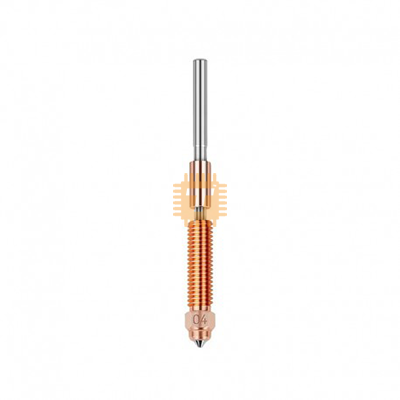
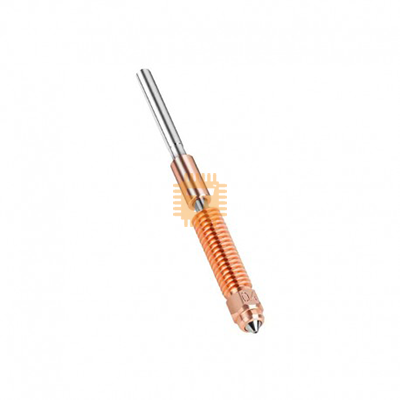
The Unicorn Quick-Swap 0.4mm 3D Printer Nozzle is an integrated bi-metal, high-flow hotend nozzle assembly engineered specifically for Creality's high-speed printer ecosystem. Featuring an all-metal unified structure combining a titanium alloy heatbreak with a hardened steel and copper alloy tipped nozzle, this quick-swap nozzle design eliminates filament leakage at threaded junctions, provides rapid thermal conductivity, and withstands both standard and abrasive composite filaments at printing speeds up to 600mm/s.
Specification
- Product Type: Integrated Quick-Swap Nozzle & Heatbreak Assembly (Unicorn Architecture)
- Orifice Diameter: 0.4mm (Standard high-resolution / high-speed extrusion size)
- Filament Compatibility: 1.75mm diameter filaments
- Material Composition: Bi-Metal Construction (Titanium Alloy Heatbreak + Copper Alloy Core Body + Hardened Steel Tip)
- Maximum Extrusion Temperature: Up to 300°C
- Supported Flow Rates: High-Flow volumetric extrusion (supports up to 30mm³/s - 32mm³/s+)
- Filament Material Compatibility: PLA, PLA+, PETG, TPU, ABS, ASA, PC, PA/Nylon, and abrasive composite filaments (PLA-CF, PETG-CF, ABS-CF, PA-CF)
- Thermal Conductivity: High-efficiency copper alloy core ensures fast heat transfer and uniform melt zone
- Wear Resistance: Hardened steel nozzle orifice prevents rapid wear from carbon fiber and glass fiber additives
- Printer Compatibility: Creality K1C, Creality K1 Max (Unicorn upgraded toolhead), Creality Ender-3 V3, and Creality Ender-3 V3 Plus.
Features
- All-Metal Unified Quick-Swap Architecture: Integrates the heatbreak tube and nozzle tip into a single precision-machined unit, completely eliminating traditional nozzle-to-heatbreak gap issues and preventing messy hotend filament leaks.
- Hardened Steel Wear-Resistant Tip: The hardened steel orifice tip offers superior abrasion resistance, allowing prolonged printing of abrasive carbon fiber, glass fiber, and glow-in-the-dark filaments without bore erosion.
- High-Conductivity Copper Alloy Body: Features a premium copper alloy melt zone that accelerates heat transfer to the filament core, supporting high-speed printing up to 600mm/s without volumetric starvation.
- Titanium Alloy Thermal Barrier: The thin-walled titanium alloy throat restricts heat from creeping upward into the cold block, significantly reducing the risk of heat creep clogs during long print cycles.
- Smooth Mirror-Polished Internal Bore: Ra < 0>
Common Applications
- High-Speed Carbon Fiber Printing: Printing lightweight, high-rigidity structural parts, drone frames, and robotics brackets using abrasive carbon fiber reinforced filaments (e.g., PLA-CF, PETG-CF, PA-CF).
- High-Speed Production Runs: Utilizing rapid 300mm/s–600mm/s acceleration capabilities on Creality K1C and Ender-3 V3 series machines without sacrificing wall quality or layer strength.
- Reliable General Prototyping: Providing a clean, clog-free standard 0.4mm baseline for everyday detailed prototyping in PLA, PETG, TPU, and ABS.
Professional Installation and Maintenance Tips
- Cold Quick-Swap Installation: Unlike traditional screw-in nozzles that require dangerous hot-tightening at 250°C+, the Unicorn unified structure can be safely installed or swapped while the toolhead is cold, avoiding accidental burns and stripped aluminum heater threads.
- Ensure Full Insertion and Set-Screw Locking: When inserting the nozzle assembly into the heatsink, push it firmly until it seats completely against the internal shoulder, then evenly tighten the heatsink retention screws to ensure proper thermal contact.
- Apply High-Temp Thermal Paste: Apply a thin layer of boron nitride or high-temperature thermal grease to the heatsink-contact portion of the throat (avoiding the nozzle tip and heater area) to maximize heat dissipation into the cold side.
- Recalibrate Auto Z-Offset and Mesh: After replacing or reseating the nozzle, always run an automated bed leveling calibration and verify your first-layer Z-offset before initiating your first print to account for microscopic height variations.
Sharing is caring, show love and share the product with your friends.
Featured



Add to Cart
Other Products
Add to Cart
Add to Cart
Add to Cart
