
Arduino Leonardo Original Development Board with Micro USB Cable (DB0026) Products
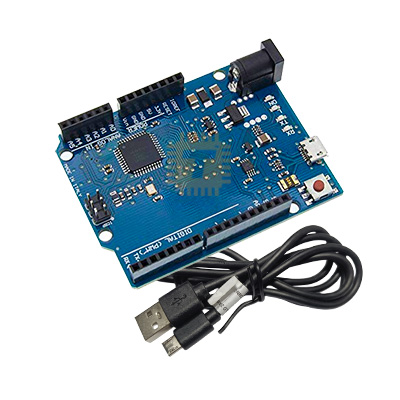
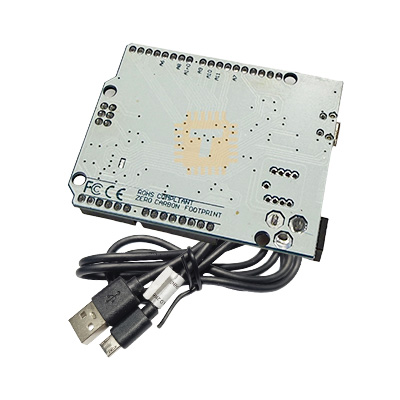
| Name | Arduino Leonardo Original Development Board with Micro USB Cable |
| Code | DB0026 |
| Price | Rs.1,950.00 |
| In Stock | Yes |
| Package | MODULE |
Product Details
The Arduino Leonardo Compatible Development Board is an open-source microcontroller board powered by the Microchip ATmega32u4. Unlike traditional boards that use a secondary chip for USB-to-serial conversion, the ATmega32u4 features native built-in USB communication. This single-chip architecture allows the board to appear directly to a connected computer as a generic Human Interface Device (HID), such as a virtual mouse, keyboard, or MIDI device, in addition to a standard virtual COM (CDC) serial port.
Specifications
- Microcontroller: Microchip ATmega32u4
- Operating Voltage: 5V DC
- Input Voltage (Recommended): 7V to 9V DC via DC barrel jack or VIN pin
- Input Voltage (Limit): 6V to 9V DC
- Clock Speed: 16 MHz crystal oscillator
- Digital I/O Pins: 20 total pins
- PWM Channels: 7 channels (Pins 3, 5, 6, 9, 10, 11, and 13)
- Analog Input Channels: 12 dedicated ADC channels (Pins A0–A5, plus digital pins 4, 6, 8, 9, 10, and 12)
- Flash Memory: 32 KB (of which 4 KB is used by the USB bootloader)
- SRAM: 2.5 KB
- EEPROM: 1 KB
- DC Current per I/O Pin: 40 mA maximum (20 mA recommended)
- DC Current for 3.3V Pin: 50 mA maximum
- USB Interface: Micro-USB port for programming, power, and serial/HID communication
- Package Inclusions: 1x Arduino Leonardo Compatible Board, 1x Micro-USB Cable
Hardware and Interface Guide
- Micro-USB Port: Provides board power, firmware flashing via the Arduino IDE, and direct USB peripheral emulation (Keyboard/Mouse HID).
- DC Barrel Jack (2.1mm Centre-Positive): External power input supporting unregulated 7V to 9V DC adapters.
- Power Header:
- VIN: Input pin for powering the board from an external 7V–9V source.
- 5V: Regulated 5V rail (supplies power to shields/sensors).
- 3.3V: Onboard regulated 3.3V supply (max 50 mA).
- GND: Common system ground pins.
- IOREF: Provides voltage reference to attached shields (fixed at 5V).
- RESET: Pull LOW to restart the microcontroller.
- ICSP Header: Standard 6-pin In-Circuit Serial Programming header for direct SPI flashing via an external programmer.
- Status LEDs: ON (Power), L (Pin 13 activity), and dedicated RX/TX indicator LEDs driven directly by USB software communication.
Key Features
- Native USB & HID Emulation: Built-in USB controller eliminates external converter chips, allowing the board to emulate physical USB keyboards, mice, gamepads, joysticks, and MIDI hardware out of the box using standard Arduino libraries.
- Independent Hardware Serial: The hardware UART (Serial1 on pins 0 and 1) is completely separated from the USB serial port (Serial), allowing external modules like Bluetooth, GPS, or GSM to communicate uninterrupted while debugging on a PC.
- Expanded Analog Inputs: Offers 12 analog input channels (A0–A5 and digital pins 4, 6, 8, 9, 10, 12), providing greater sensor density than standard Uno layouts.
- Arduino Shield Compatible: Matches the standard Uno R3 form factor and pin spacing, maintaining hardware compatibility with most existing add-on expansion shields.
Common Applications
- Custom Human Interface Devices (HID): Sim racing button boxes, custom macro keypads, flight simulator controls, and assistive accessibility mice.
- Automation & Keystroke Injection: Automated test sequences, hardware authentication keys, and rapid data-entry macros.
- Robotics & Multi-Sensor Platforms: Mobile robot chassis requiring multiple analog sensor inputs alongside hardware serial radio links.
- Educational & Prototyping Projects: General embedded design, STEM education, and learning C/C++ firmware development.
Usage Tips
- IDE Serial Port Handling: Because USB is handled natively by the microcontroller code, opening the Serial Monitor does not automatically reset the board like on an Arduino Uno. When writing sketch code that requires early serial messages, include while (!Serial); in setup() to wait for the USB connection to initialize.
- Board Selection in Arduino IDE: Select Tools > Board > Arduino AVR Boards > Arduino Leonardo before compiling and uploading code.
- SPI Header Routing: Unlike the Uno, the Leonardo’s SPI bus (MOSI, MISO, SCK) is routed only to the 2x3 ICSP center header pins and is not connected to digital pins 11, 12, and 13. Ensure that SPI-based shields connect via the ICSP header.
Sharing is caring, show love and share the product with your friends.
Featured


Add to Cart

Add to Cart

Add to Cart
Other Products

Add to Cart
Add to Cart

Add to Cart

Add to Cart
