2.7inch EInk Epaper Display Module Black Color for Raspberry Pi SPI interface (MD1057) Products
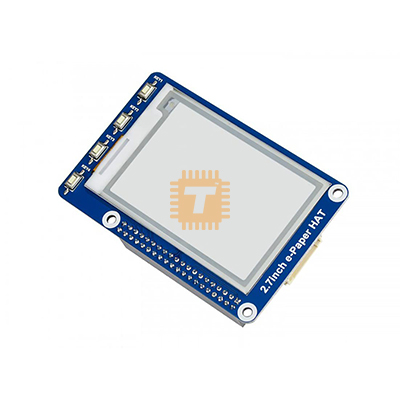
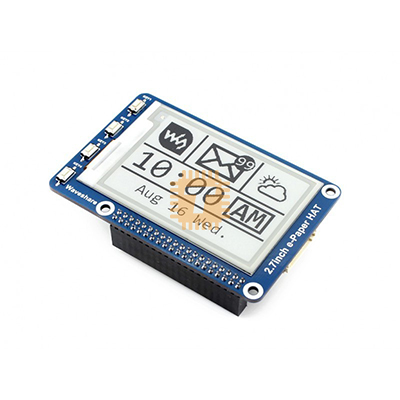
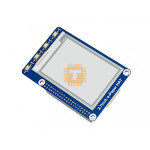
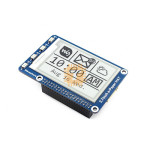
| Name | 2.7inch EInk Epaper Display Module Black Color for Raspberry Pi SPI interface |
| Code | MD1057 |
| Price | Rs.6,590.00 |
| In Stock | Yes |
| Package | MODULE |
Product Details
The 2.7inch EInk Epaper Display Module Black Color for Raspberry Pi SPI interface is an ultra-low-power electrophoretic display (EPD) breakout board engineered for ambient status panels, smart shelf labels, wearable electronics, IoT sensor dashboards, and edge-computing devices running on Raspberry Pi, Arduino, STM32, or ESP32 platforms. Utilizing active microcapsule electrophoretic display technology, it visualizes crisp, high-contrast monochrome text and bitmap graphics that mimic the appearance of printed ink on paper, offering clear sunlight readability and an ultra-wide viewing angle of greater than 170°. Because microcapsules retain their state bistably without continuous electrical stimulation, the display consumes zero power while maintaining a static image indefinitely, drawing current only during screen refresh cycles.
Specifications
- Display Technology: Active Matrix Electrophoretic Display (AMEPD / E-Paper / E-Ink)
- Screen Diagonal Size: 2.7 Inches (Approx. 68.6 mm)
- Active Display Area: 57.288 mm × 38.192 mm (W × H)
- Native Resolution: 264 × 176 Pixels
- Pixel Pitch / Density: 0.217 mm × 0.217 mm (~117 DPI)
- Display Colors: 2 Colors (Monochrome: Black and White)
- Grayscale Levels: 2-Level Grayscale (1-bit binary pixel depth; partial 4-level grayscale supported via custom LUT)
- Host Communication Interface: 3-Wire / 4-Wire Standard SPI (Serial Peripheral Interface)
- Operating Supply Voltage (VCC): 3.3 V to 5.0 V DC (Onboard low-dropout regulator and level shifter)
- Logic Signal Level: 3.3 V / 5.0 V TTL Compatible (Directly interfaces with 5V Arduino and 3.3V Raspberry Pi)
- Refresh Power Consumption: Approx. 26.4 mW (Typical full refresh cycle)
- Standby / Static Power Consumption: ≤ 0.017 mW (< 5>
- Full Refresh Time: Approx. 6.0 seconds (Includes waveform sequence, clear, and write operations)
- Partial Refresh Time: Supported on select controller revisions (Approx. 0.3 to 0.5 seconds)
- Viewing Angle: Ultra-Wide > 170° (Reflective display without backlight glares)
- Interface Header: Standard 8-Pin 2.54 mm Pitch Jumper Header / 200mm PH2.0 8-Pin Cable
- Operating Ambient Temperature Range: 0°C to +50°C (32°F to 122°F)
- Storage Temperature Range: -20°C to +60°C
- Outline Board Dimensions: Approx. 85.0 mm × 56.0 mm × 7.8 mm (Standard Raspberry Pi HAT outline footprint)
- Net Weight: Approx. 26 g to 32 g
Pinout & Terminal Definition
- VCC: Positive Power Supply Input (+3.3 V to +5.0 V DC)
- GND: Ground Reference Connection (0 V)
- DIN (MOSI): SPI Master-Out-Slave-In Data Line (Carries pixel data and control commands from MCU)
- CLK (SCLK): SPI Serial Clock Input
- CS: SPI Chip Select Input (Active LOW; enables communication with the display controller)
- DC: Data / Command Selection Control Pin (HIGH for display data buffer; LOW for control command registers)
- RST: External Hardware Reset Pin (Active LOW; pulses low to reinitialize internal controller registers)
- BUSY: Busy Status Output Pin (Active HIGH; indicates internal refresh cycle in progress; MCU must wait until pin goes LOW)
Features
- Zero-Power Static Image Retention: Micro-particles remain physically locked in position by electrostatic bistability, preserving full image contrast indefinitely even if main power is completely disconnected.
- Paper-Like Daylight Readability: Relies on ambient light reflection rather than an active backlight, providing a crisp, glare-free reading experience under direct midday sunlight with minimal eye strain.
- Integrated Onboard Voltage Level Translator: Features integrated bidirectional level-shifting circuitry compatible with both 3.3V (Raspberry Pi, ESP32, STM32) and 5.0V (Arduino UNO, Mega) logic rails without needing external resistors.
- Standard 4-Wire SPI Bus: Uses only 6 to 7 GPIO lines, preserving remaining microcontroller pins for sensors, networking radios, and peripherals.
- Raspberry Pi HAT Form Factor: Mounting holes and connector alignment allow direct installation onto Raspberry Pi 3B+, 4B, 5, and Zero models using standard standoffs.
Common Applications
- IoT Environmental Sensor Monitors: Visualizing temperature, humidity, air quality index, and barometric pressure data from battery-backed weather stations.
- Smart Shelf & Inventory Labels: Electronic shelf labels (ESL), stock warehouse bin indicators, and dynamic price tags updated via wireless sub-GHz or Wi-Fi links.
- Smart Home & Automation Dashboards: Desktop status displays for calendar appointments, daily reminders, cryptocurrency trackers, and transit arrival timetables.
- Wearable & Outdoor Instrumentation: Battery-operated GPS wayfinders, e-badge conference passes, and cycling computer heads.
- Industrial Equipment Status Badges: Maintenance schedule readouts, machinery lockout notices, and QR code asset tracking tags.
Usage Tips
- BUSY Pin Handling (CRITICAL):
- During a refresh sequence, the onboard timing controller generates high-voltage driving waveforms to translate the pigment particles.
- Always monitor the BUSY pin in software before issuing new data or refresh commands. Sending instructions while the BUSY line is asserted (HIGH) will corrupt the internal frame buffer and cause visual screen tearing.
- Deep Sleep Mode for Battery Preservation:
- Once the image has rendered on the screen and the BUSY pin returns to LOW, immediately issue the controller command for Deep Sleep Mode in your firmware.
- This turns off internal charge pumps and drops the driver IC's quiescent standby current to below 5 μA, prolonging coin-cell or 18650 battery life.
- Preventing Image Burn-In & Ghosting:
- If partial refresh is used repeatedly to update clock seconds or real-time numbers, residual ghosting will gradually accumulate.
- Perform a full refresh cycle at least once every 24 hours (or after every 5 to 10 partial updates) to clean the particle matrix and reset particle polarization.
- Do not leave a single static frame unchanged for months on end in direct sunlight; cycle the screen occasionally to prolong chemical fluid lifespan.
- Operating Temperature Envelope: Electrophoretic particle mobility depends heavily on ambient fluid viscosity. Operate and update the screen strictly between 0°C and +50°C. Refreshing the display below freezing (0°C) can cause permanent physical degradation to the internal microcapsule fluid.
- Raspberry Pi SPI Configuration: Before running Python or C demo drivers on a Raspberry Pi, ensure the SPI hardware interface is enabled by executing sudo raspi-config → Interface Options → SPI → Enable, followed by a system reboot.
Sharing is caring, show love and share the product with your friends.
Featured


Add to Cart

Add to Cart
Add to Cart