EM5822 Thermal Receipt Printer 58mm 12V USB Serial TTL/RS232 (MD1037) Products
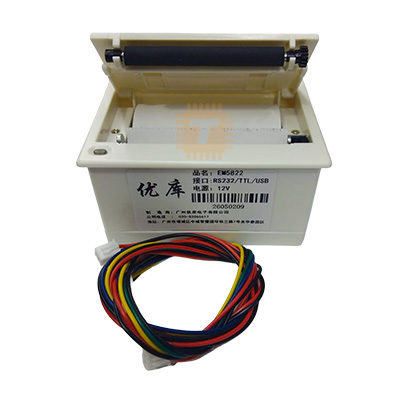
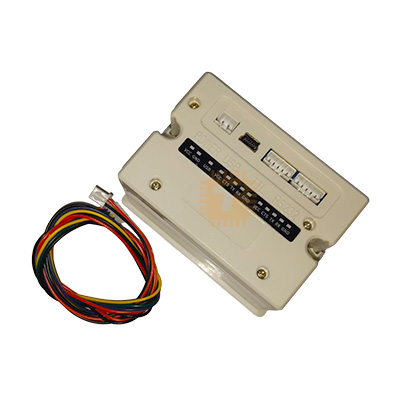
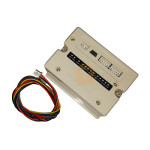
| Name | EM5822 Thermal Receipt Printer 58mm 12V USB Serial TTL/RS232 |
| Code | MD1037 |
| Price | Rs.8,250.00 |
| In Stock | Yes |
| Package | PRINTER |
Product Details
The EM5822 58mm Embedded Panel Mount Thermal Receipt Printer (12V USB / Serial TTL / RS232) is a rugged, compact direct-thermal printing mechanism engineered for seamless integration into commercial kiosks, point-of-sale (POS) terminals, and industrial instrumentation panels. Powered by an external 9V–12V DC power supply, it features versatile multi-interface communication including USB, standard RS232 serial, and 3.3V/5V microcontroller-friendly TTL UART. Utilizing standard 57mm/58mm thermal paper rolls, the printer delivers crisp, high-contrast text, 1D/2D barcodes (including QR codes), and monochrome bitmap graphics at print speeds up to 90 mm/s. Its standard ESC/POS command compatibility, built-in paper-out detection, manual tear bar, and front-loading clamshell mechanism make it widely used in parking meters, token queue systems, medical diagnostic instruments, weighing scales, and embedded microcontroller projects.
Specifications
- Model / Part Number: EM5822 / EM-5822 (Panel Mount Thermal Printer Module)
- Printing Method: Direct Line Thermal Printing
- Print Resolution: 203 DPI (8 dots/mm, 384 dots/line)
- Effective Printing Width: 48 mm
- Supported Paper Width: Standard 57.5 mm ± 0.5 mm (58 mm)
- Maximum Paper Roll Diameter: Max. 39 mm to 40 mm (Internal Clamshell Enclosure)
- Print Speed: 50 mm/s to 90 mm/s (depending on drive voltage and print density)
- Operating Power Supply: 9V to 12V DC (Nominal: 12V DC, 2A to 3A Peak)
- Quiescent Standby Current: Typ. 30 mA to 50 mA
- Peak Printing Current: 1.5 A to 3.0 A (during high-density black image/barcode printing)
- Supported Communication Interfaces:
- USB (Virtual COM Port / USB POS Printer Class)
- UART Serial TTL (3.3V / 5V Logic Level Compatible)
- RS232 Serial (Standard DB9 / ±12V Industrial Levels via onboard transceiver)
- Default Serial Baud Rate: 9600 bps or 115200 bps (8-N-1: 8 Data Bits, No Parity, 1 Stop Bit - Configurable)
- Command Set Compatibility: ESC/POS Standard Control Commands
- Character Sets Supported: ASCII (Font A: 12×24 dots, Font B: 9×17 dots), Extended Graphics Character Tables, Simplified Chinese / International code pages
- Barcode Symbologies:
- 1D Barcodes: UPC-A, UPC-E, EAN-13, EAN-8, CODE39, ITF, CODABAR, CODE93, CODE128
- 2D Barcodes: QR Code, PDF417
- Paper Cutting Method: Integrated Serrated Manual Tear Bar
- Paper Loading: Easy-Load Front Clamshell / Drop-in Paper Roll Structure
- Sensors: Photoelectric Paper-Out / Paper-End Sensor
- Thermal Print Head (TPH) Lifespan / Reliability: 50 km (Mechanical/Thermal MCBF)
- Operating Ambient Temperature: 0°C to +50°C (10% to 80% RH Non-Condensing)
- Storage Temperature: -20°C to +60°C
- Panel Cutout Dimensions: Approx. 103 mm × 57 mm (Outer Bezel: Approx. 111 mm × 65 mm × 57 mm)
Features
- Versatile Multi-Interface Connectivity: Equipped with USB, Serial RS232, and TTL UART on unified header connections, allowing plug-and-play interfacing with Windows/Linux PCs, Android tablets, Raspberry Pi, Arduino, ESP32, and industrial PLCs.
- Industry-Standard ESC/POS Command Compatibility: Fully compatible with Epson ESC/POS command sequences for text alignment, custom font sizing, line spacing, inverted printing, and bitmap raster rendering.
- Easy Drop-In Paper Loading: Front button release pops open the clamshell lid for rapid roll replacement in seconds without threading or aligning paper gears.
- High-Contrast 203 DPI Printing: Produces sharp, scannable 1D barcodes and 2D QR codes along with custom receipts, store logos, and sensor telemetry tables.
- Flush Panel-Mount Enclosure: Built-in spring-loaded side clips lock the unit securely into kiosk sheet metal, instrument front panels, or custom 3D-printed project enclosures.
- Built-in Paper-Out Detection: Hardware sensor halts printing and reports status over serial lines when the paper roll runs out, preventing head burnout and skipped data.
Common Applications
- Self-Service Kiosks & Queue Token Systems: Automated ticket and receipt dispensers for bank counters, clinic waiting rooms, and food ordering kiosks.
- Point-of-Sale (POS) & Billing Terminals: Compact receipt printers for retail cash registers, micro-billing setups, and parking toll booths.
- Medical & Analytical Instrumentation: Real-time patient monitor log printers, blood gas analyzers, and clinical test strip readers.
- Weighing Scales & Industrial Test Benches: Automated weight ticket logging, material test reports, and factory QC record printing.
- Microcontroller & Robotics Projects: Datalogger and receipt generation on Arduino, ESP32, STM32, and Raspberry Pi automation systems.
Usage Tips
- Power Supply Peak Current (Critical): Thermal print heads draw sudden current spikes during dark graphic or dense text printing. Always use a dedicated **12V DC power supply rated for at least 2.0A to 3.0A**. Powering from weak 500mA supplies or direct USB rails will result in faded printing, erratic paper stalling, or processor resets.
- Thermal Paper Orientation: Thermal paper is coated with a heat-sensitive layer on **one side only**. Ensure the roll is placed so the outer shiny layer unrolls directly against the thermal print head on the bottom of the mechanism. If receipts print completely blank, the paper roll is inserted backward.
- TTL UART vs. RS232 Port Selection: When connecting directly to 3.3V or 5V microcontrollers (e.g., Arduino TX/RX or ESP32 GPIOs), ensure you tap into the **TTL UART header pins, NOT the RS232 port**. Connecting MCU GPIOs directly to true RS232 levels (±12V) will permanently damage the microcontroller.
- Baud Rate & Serial Flow Control: The default factory baud rate is typically 9600 bps or 115200 bps (printable on the printer's self-test page). When printing complex graphics or continuous receipts over high baud rates, monitor the printer's busy/buffer status or insert small delays (50ms–100ms) between print bursts to prevent buffer overflow.
- Self-Test Page Printing: To confirm power integrity, font tables, and default baud rates, hold down the front paper-feed button while connecting the 12V power supply. Release the button after power is applied to print the factory self-test diagnostic slip.
Sharing is caring, show love and share the product with your friends.
Featured

Add to Cart


Other Products


Add to Cart