
RS232 Serial to TTL Converter Module MAX3232 Dual Row (MD1030) Products
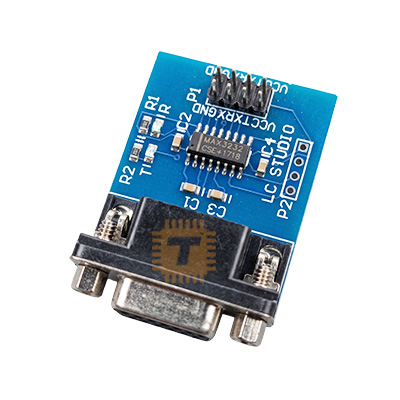
We are sorry but the product is out of stock, please check back after few days.
| Name | RS232 Serial to TTL Converter Module MAX3232 Dual Row |
| Code | MD1030 |
| Price | Rs.450.00 |
| In Stock | No |
| Package | MODULE |
Product Details
The MAX3232 RS232 to TTL Converter Module is a bidirectional level shifter engineered to bridge the communication gap between legacy RS232 serial ports (which operate at ± 12V) and modern microcontroller UART ports (which operate at 3.3V or 5V TTL logic). This specialized Dual Row variant features an ultra-compact footprint with mirrored or parallel dual-row pin configurations, making it incredibly easy to embed directly into tight enclosures, breadboards, or custom PCB headers.
Unlike the older MAX232, the onboard MAX3232 IC supports true low-voltage systems, allowing you to interface directly with both 3.3V devices (like ESP32 and Raspberry Pi) and 5V devices (like Arduino Uno) without needing separate logic level shifters.
Technical Specifications
- Converter Chip: MAX3232 (or SP3232 alternative)
- Protocol: RS232 Asynchronous Serial
- Operating Voltage: 3.0V to 5.5V DC
- Logic Level Support: Fully compatible with 3.3V and 5V systems
- Max Baud Rate: Up to 250 kbps (typical guaranteed 120 kbps)
- Channels: Dual Transmitters & Dual Receivers (Full Duplex)
- Operating Current: Approx 8mA
- Pin Spacing: Standard 2.54mm (0.1 inch) pitch, Dual-Row layout
Features
- Wide Voltage Versatility: Eliminates the risk of logic level mismatch. It automatically scales its translated outputs based on the Vcc voltage supplied by your host microcontroller.
- Dual Transceiver Capacity: Contains two independent driver/receiver channels, allowing you to run a full hardware-flow-control serial bus (TX, RX, CTS, RTS) or run two distinct TX/RX serial lines simultaneously.
- On-Chip Charge Pump: Uses four tiny onboard surface-mount capacitors to multiply low input voltages into the higher positive and negative voltage rails required by RS232 lines.
- High ESD Protection: Protects sensitive microcontroller pins from standard electrostatic discharges often encountered when plugging and unplugging rugged serial data cables.
- Hardware Recovery Utility: Widely used as a "brush board" tool to flash firmware, unbrick routers, or extract diagnostic boot logs from home appliances and hard drives.
Pin Configuration (Dual-Row Layout)
The module breaks out the pins into a convenient dual-row format, typically separating the TTL Logic side from the RS232 High-Voltage side:
TTL Side (To Microcontroller / UART)
- VCC: Power Supply Input (3.3V or 5V). Matches your MCU's logic level.
- GND: Common system ground.
- TXD / TTL-TX: Connects to the Transmit pin of your microcontroller's UART.
- RXD / TTL-RX: Connects to the Receive pin of your microcontroller's UART.
RS232 Side (To PC COM Port / Legacy Device)
- VCC / +: Secondary or pass-through power rail.
- GND / -: Secondary system ground.
- RS232-TX: The high-voltage output signal heading to the remote RS232 device.
- RS232-RX: The high-voltage input signal coming from the remote RS232 device.
Common Applications
- Firmware Flashing & Upgrades: Upgrading software or fixing corrupted firmware on routers, satellite set-top boxes, and automotive infotainment systems.
- Industrial Interfacing: Connecting modern IoT gateways to vintage PLCs, CNC machines, barcode scanners, and scientific instruments using traditional DB9 connectors.
- Legacy Peripheral Control: Allowing microcontrollers to communicate with older GPS receivers, external dial-up modems, or POS receipt printers.
- PC-to-MCU Debugging: Directly piping raw serial data from an industrial computer's physical serial COM port down into a development circuit board.
Usage & Installation Tips
- Rx/Tx Crossover Rules: When wiring the TTL side to your microcontroller, remember to map TXD to RX and RXD to TX. However, check your specific module markings; some breakout boards pre-cross the traces for convenience.
- Match the Voltage Supply: If you are connecting the module to an ESP32 or Raspberry Pi, power the module's Vcc pin with 3.3V. If you power it with 5V while hooked to a 3.3V processor, the RX line will output 5V spikes that can burn out the microcontroller's GPIO pin.
- Keep High-Voltage Lines Insulated: The RS232 side runs at native serial voltages up to ± 12V – ± 15V. Ensure these traces do not accidentally touch adjacent lower-voltage digital sensor pins on your breadboard.
- Verify Cable Continuity: RS232 devices can be configured as DTE (Data Terminal Equipment) or DCE (Data Circuit-terminating Equipment). If communication fails despite correct logic wiring, you may need a Null Modem adapter or swapped TX/RX lines on the RS232 side.
Sharing is caring, show love and share the product with your friends.
Featured

Add to Cart

Add to Cart

Other Products

Add to Cart
Add to Cart
